
Your entire store
inside WhatsApp.
A bot on your own WhatsApp number shows buyers your products, takes the order and asks for UPI or cash on delivery. The same products fill your online store at wazbuy.com/yourstore.
 Silk Sarees
 Kurta Sets
 Dresses
Made for the Indian Market
Three steps to a shop that answers by itself.
Connect your WhatsApp number
Use the number your buyers already know. Keep the WhatsApp Business app on your phone and reply from it whenever you like.
Add your products
Add photos, prices, sizes, colours and stock once. WazBuy uses them in every chat and on your store.
Sell in the chat and online
Buyers order on WhatsApp or on your store. You confirm the orders, pack them and mark them shipped.
Four messages you answer every day.
The bot answers them for you.
Watch one order go from the first question to the parcel. Tap a moment to jump to it.
All the tools to sell on WhatsApp.
One login for your chats, your store, your orders and your numbers.
WhatsApp bot
More- Works on your own numberNext to the WhatsApp Business app
- Products in the chatPhoto, price and stock from a code or name
- Checkout in the chatAddress, delivery charge, UPI or cash
- Smart replies PremiumAnswers in the buyer's language, using AI reply credits
Inbox
More- Every chat in one placeIncluding the ones you answer on your phone
- Needs youChats the bot handed to you, with the reason
- Fix this answerCorrect a bot reply from the chat
- AlertsA note in the app, and email with smart replies
Automations
More- Ready startersOffers, new arrivals, bulk orders, feedback
- Your own triggersA word, a new buyer, an ad click
- Help the botAnswer once, and every buyer gets it
- Numbers the bot ignoresVendors, staff, family, delivery
Online store
More- wazbuy.com/yourstoreYour own link for bio, reels and status
- 20 designsChange photos, colours, fonts and sections
- Search and collectionsFilters, sort, Add to cart, Buy now
- Website checkoutUPI, cash on delivery or your Razorpay
Orders and shipping
More- One orders boardTo do, waiting for payment, shipped, done
- Ship with trackingThe courier and a Track order button
- Delivery chargesYour state, other states, free above an amount
- Orders you makeFor buyers who order by message or call
Products and numbers
More- Up to 10 photosAnd one photo for each colour
- Sizes, colours and stockEach with its own price and count
- WhatsApp analyticsBuyers, messages, busiest times
- ReportsSales, profit, GST and website visitors
A shopping bot on the number your buyers already know.
Buyers message you as they always do. The bot greets them, sends the product they ask for and takes the order inside the chat.
- Keep your WhatsApp Business app. You and the bot reply in the same chat. Your old chats can come with you, up to 6 months back.
- Products from a code. Put a product code like P1023 on your reel or status. When a buyer sends it, the bot replies with the photo, price and what is in stock.
- Checkout without leaving WhatsApp. The bot asks for the address, adds your delivery charge and offers UPI or cash on delivery.
- Updates you do not type. A chat order gets a message when it is placed. When you ship, the buyer gets the courier name, and a Track order button when you add a tracking link.
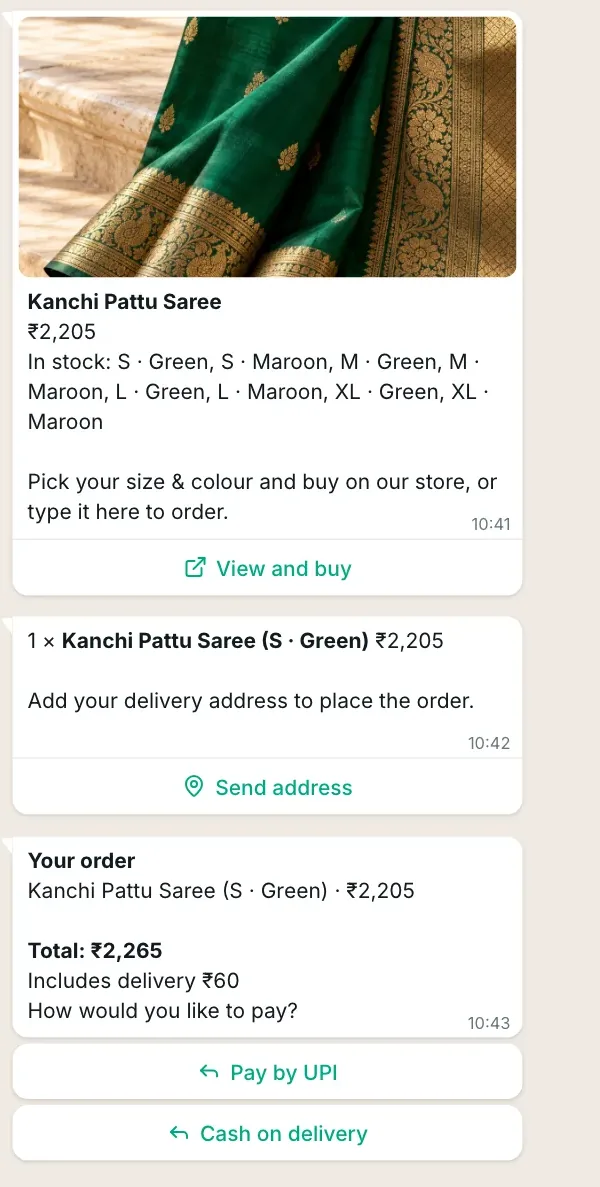
Real messages from the WazBuy bot, as your buyer sees them.
Answers for the questions no menu covers.
Smart replies read your products, your Knowledge page and the answers you gave before. Then they reply to the buyer's own question, in the buyer's own words. Each reply sent to a buyer uses one AI reply credit.
- The buyer's language. English, Tamil, Hindi, or mixed like Tanglish and Hinglish.
- No made-up answers. It is told never to invent a price or a policy, and it checks prices against your catalogue. When it is not sure, it hands the chat to you.
- It learns from you. Questions it could not answer wait in Help the bot. Answer once, and every buyer after that gets your answer.
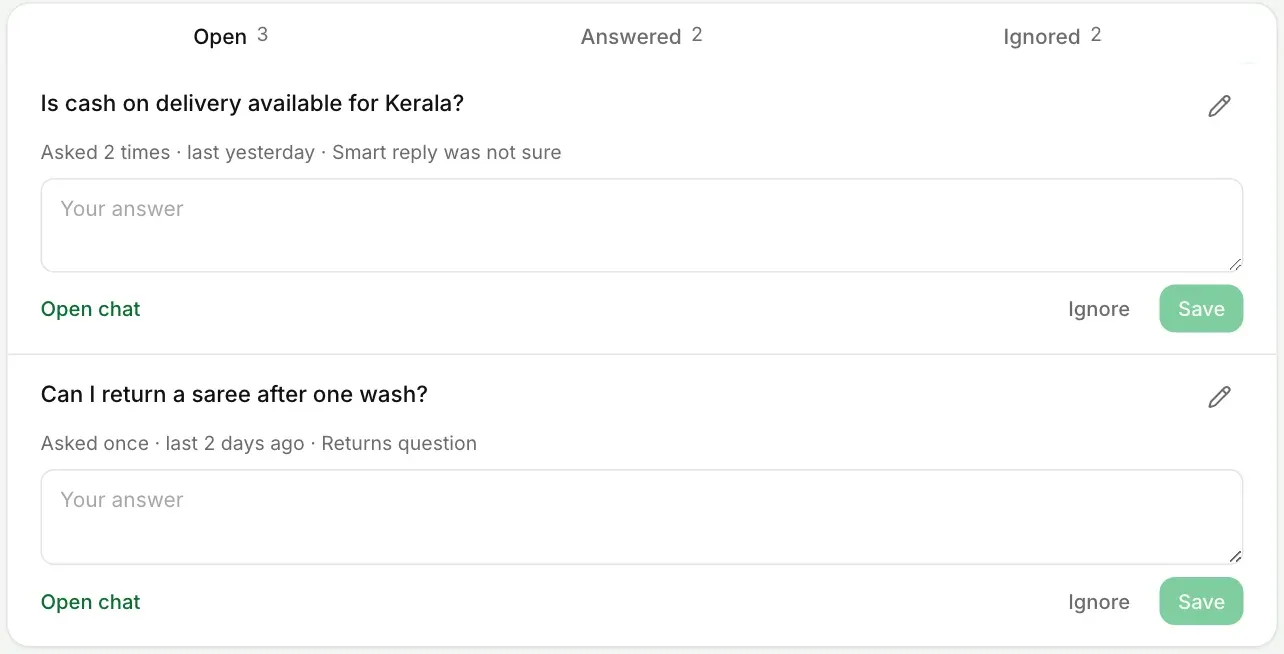
Help the bot lists the questions buyers asked that the bot could not answer yet.
One inbox. The bot tells you who needs you.
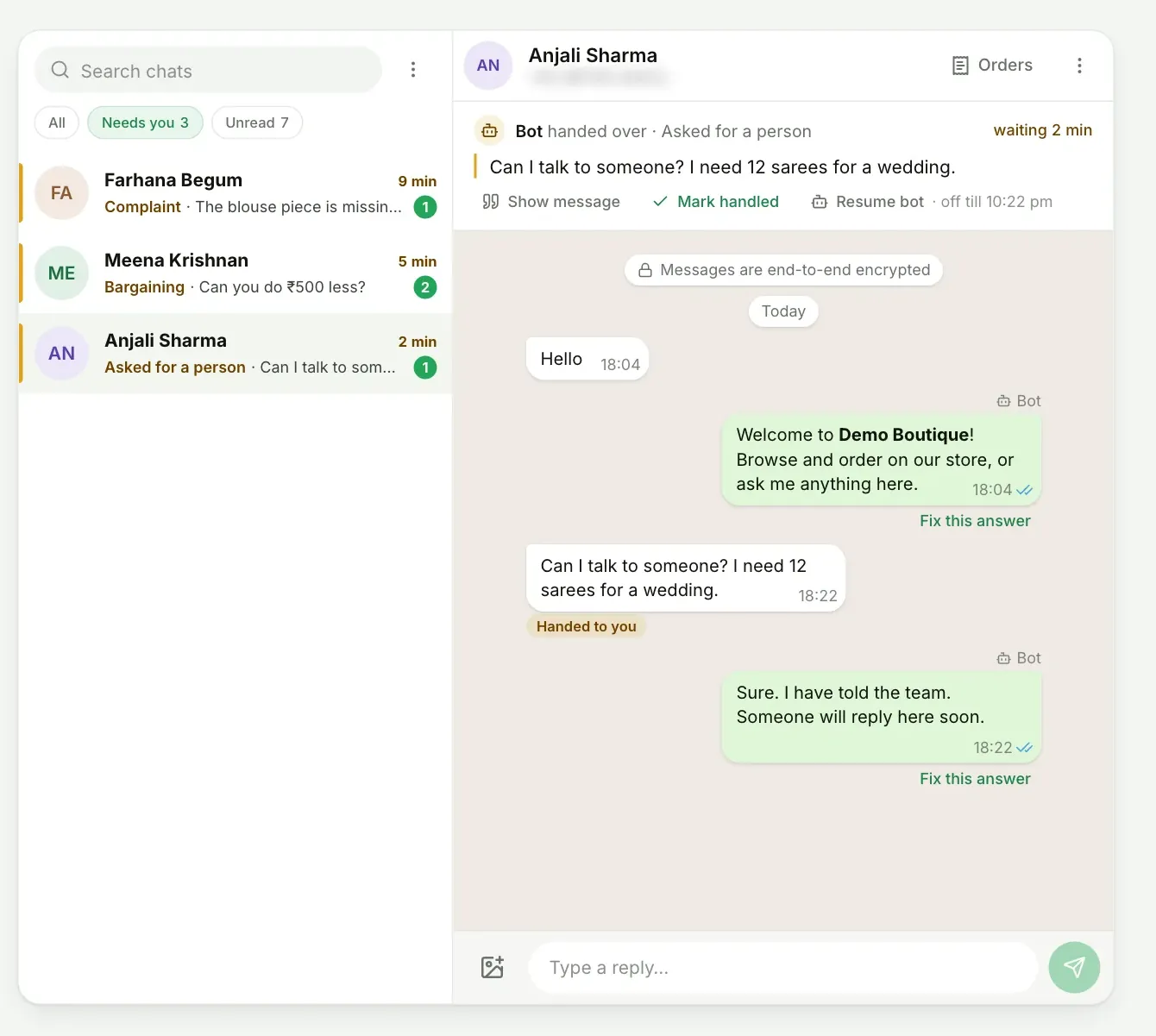
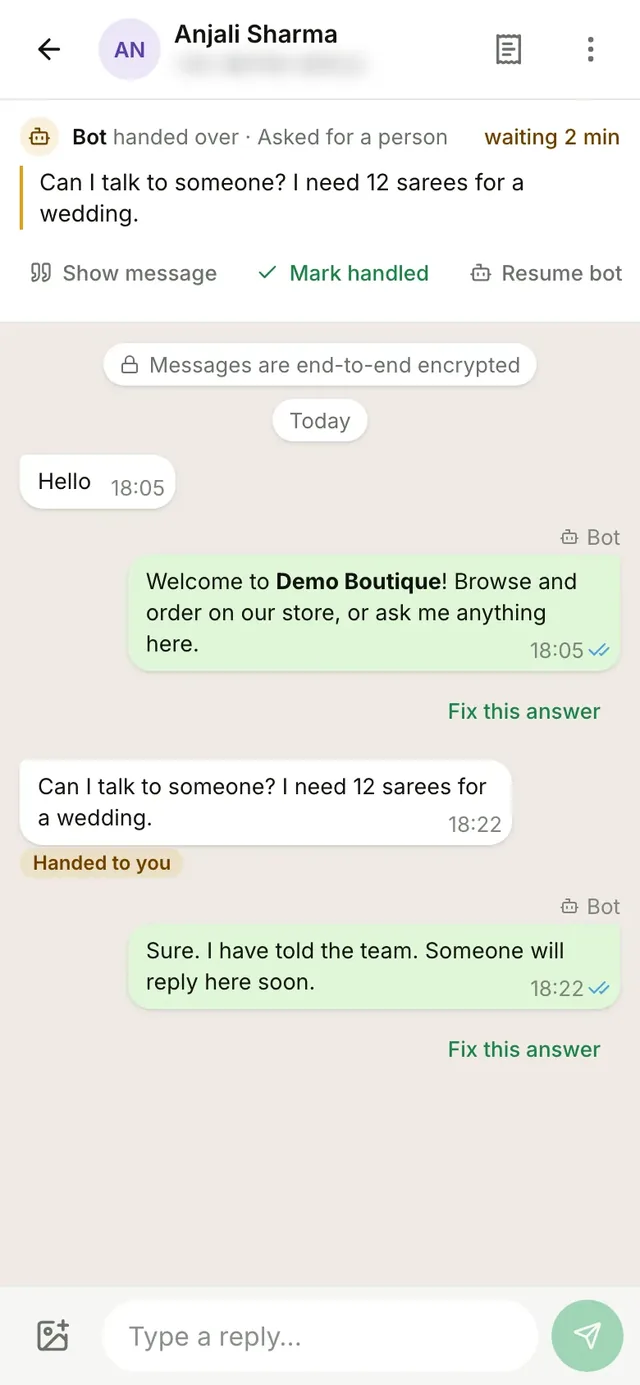
Every WhatsApp chat lands here, even the ones you answer from your phone. When the bot hands a chat over, the reason sits at the top.
- Needs you. The bot can hand over buyers who ask for a person, bargain, complain or want a bulk order. They wait in their own list.
- Clear labels. Each message shows if it came from the bot, from WazBuy or from your phone.
- Fix this answer. Correct any bot reply right from the chat.
- Alerts that reach you. A note pops up in WazBuy when a chat needs you. With smart replies, you can also get an email for every handover.
Your own automatic messages, built in minutes.
When someone sends DIWALI, send your offer. When a buyer comes from an ad, send your best sellers. You decide what starts it and what goes out.
- Start from a ready one. Sale from an ad, New arrivals, Bulk order, Diwali offer and Feedback after delivery.
- Pick what starts it. A word, a new customer, an ad click or an order update.
- Drop in the steps. Text with buttons, images, products, a question, a wait, a tag, or Hand to you.
- Numbers the bot ignores. Mark vendors, staff, family and delivery partners. The bot stays quiet with them.
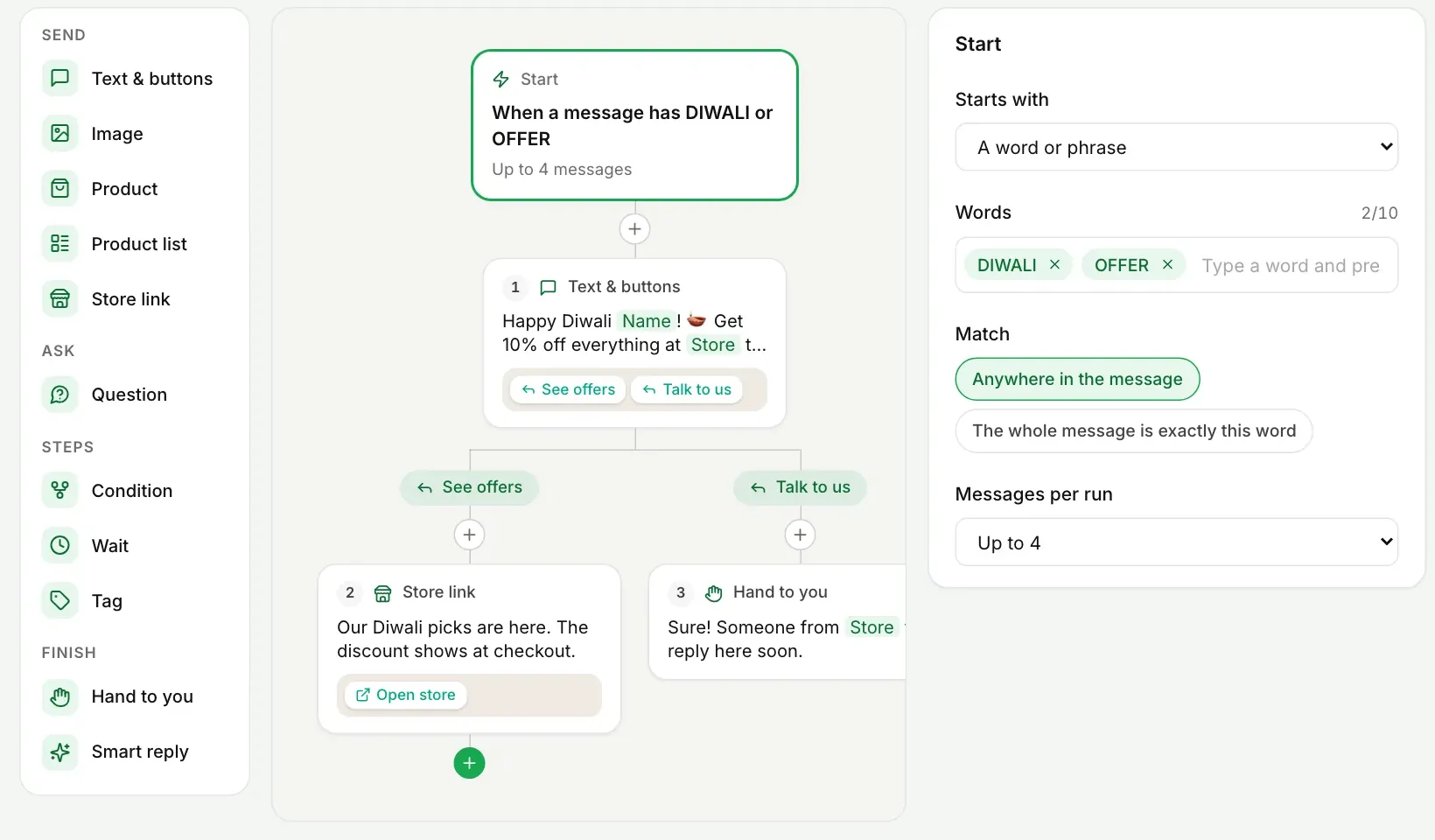
A Diwali offer, built from blocks on the left.
Your own store at wazbuy.com/yourstore.
Your WazBuy products also make a full website. Share one link in your bio, on your reels and on your WhatsApp status.
- Easy to shop. Search, filters, sort and collections. Add to cart right from the product card, or Buy now.
- Website checkout. Buyers pay by UPI or cash on delivery. Connect your own Razorpay for cards, netbanking and wallets. WazBuy takes no cut.
- Buy on WhatsApp. Buyers can also buy on WhatsApp from any product page and finish the order in the chat.
- Your pages. Refund, shipping, privacy and terms pages, your social links and a WhatsApp chat button.

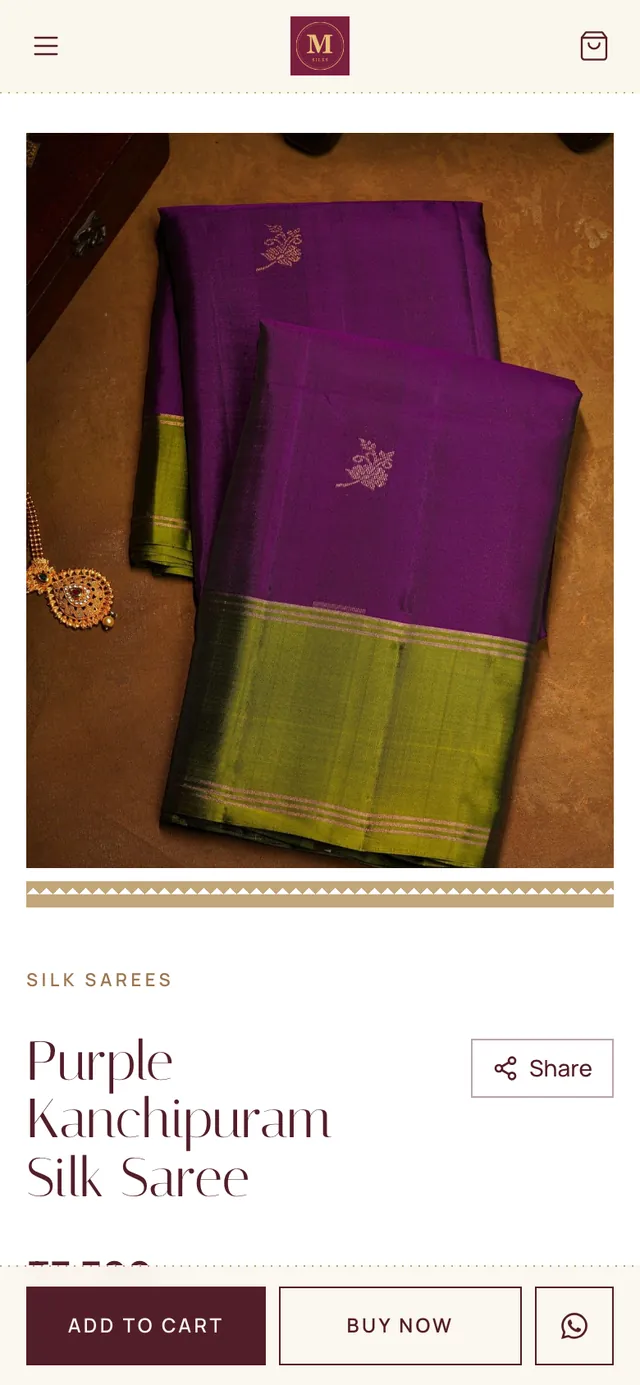
A WazBuy test store, on a computer and on a phone.
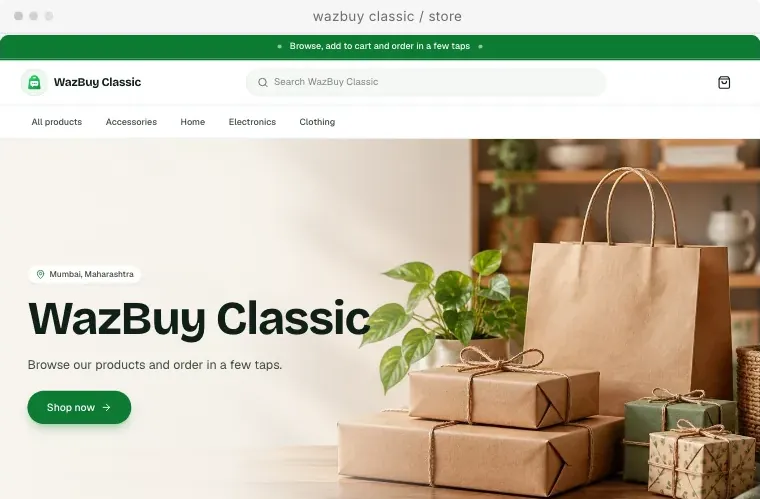
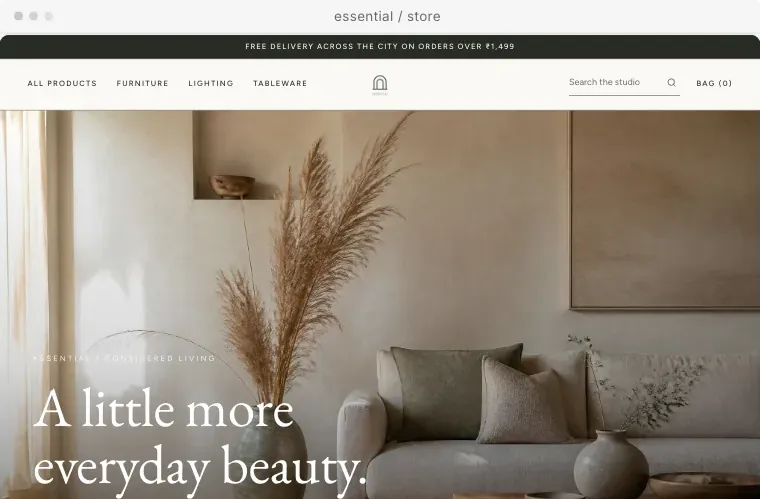

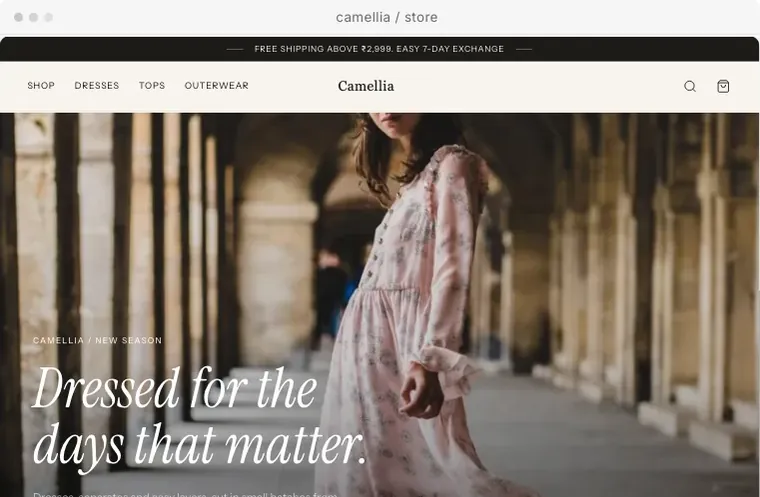
4 of the 20 store designs. The designs you can pick depend on your plan.
Make the store look like your shop.
Click any part of the page to change it. Check how it looks on a phone, save a draft, and publish when you are happy.
- Banner and logo. Use your own photo or video, and your logo.
- Colours and fonts. Pick a colour set and a font that suits what you sell.
- Sections and menus. Add, move or remove sections, menu links, slides and footer blocks.
What you can change depends on your plan.
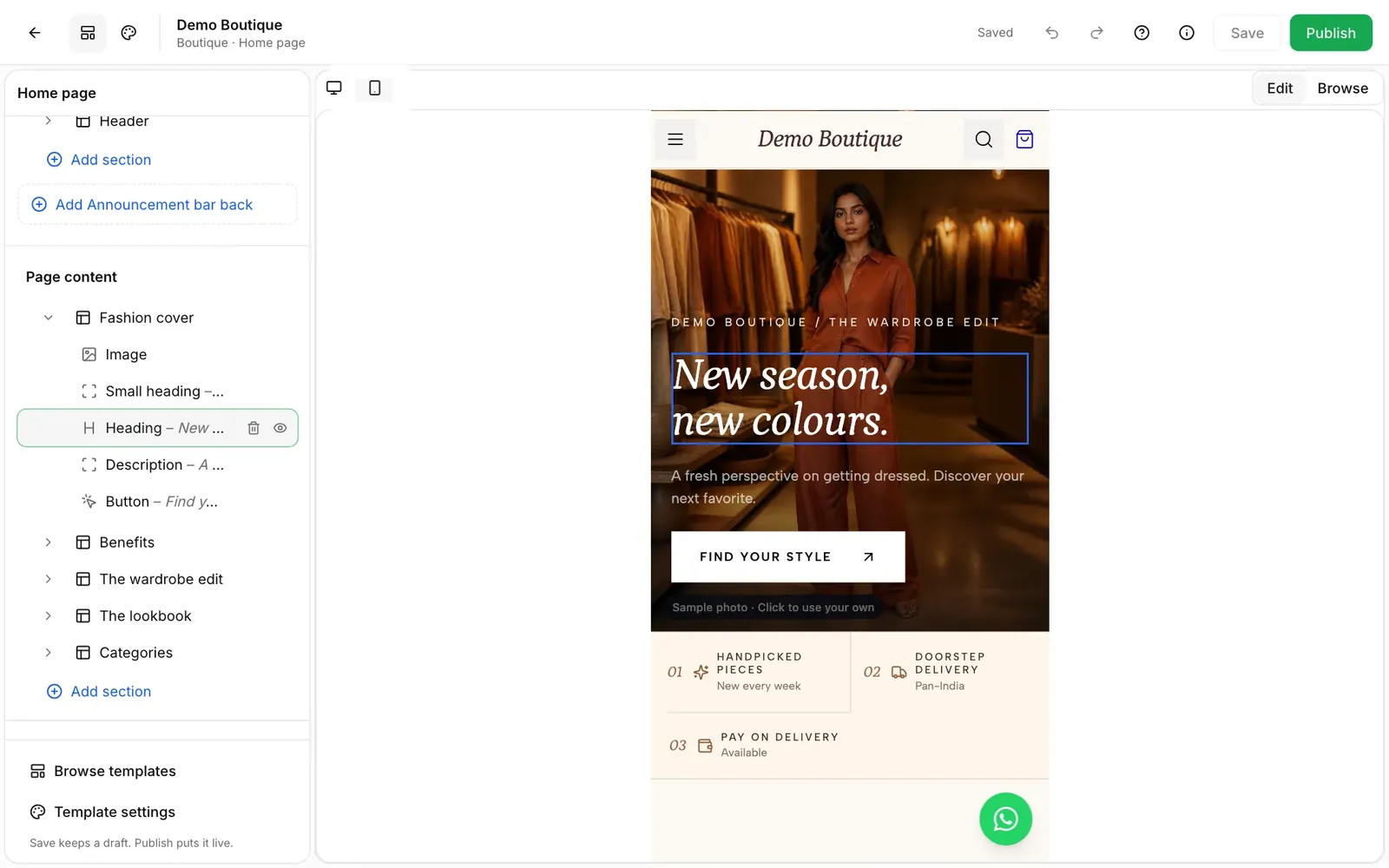
Every order, from placed to delivered.
Orders from WhatsApp and from your store land on one board. The next step is always one button away.
- Nothing is confirmed until you say so. Check the UPI screenshot on the order, then confirm. Razorpay payments confirm by themselves, and cash on delivery orders can too if you switch on Confirm cash on delivery orders automatically.
- Ship with tracking. Type the courier and the tracking number. The buyer gets the courier on WhatsApp, and a Track order button when you add a tracking link.
- Delivery charges. One rate for buyers in your state and one for other states, with free shipping above an amount you choose.
- Orders you make yourself. A buyer ordered by call or message? Make the order in WazBuy with a discount, a delivery charge and their GST number.
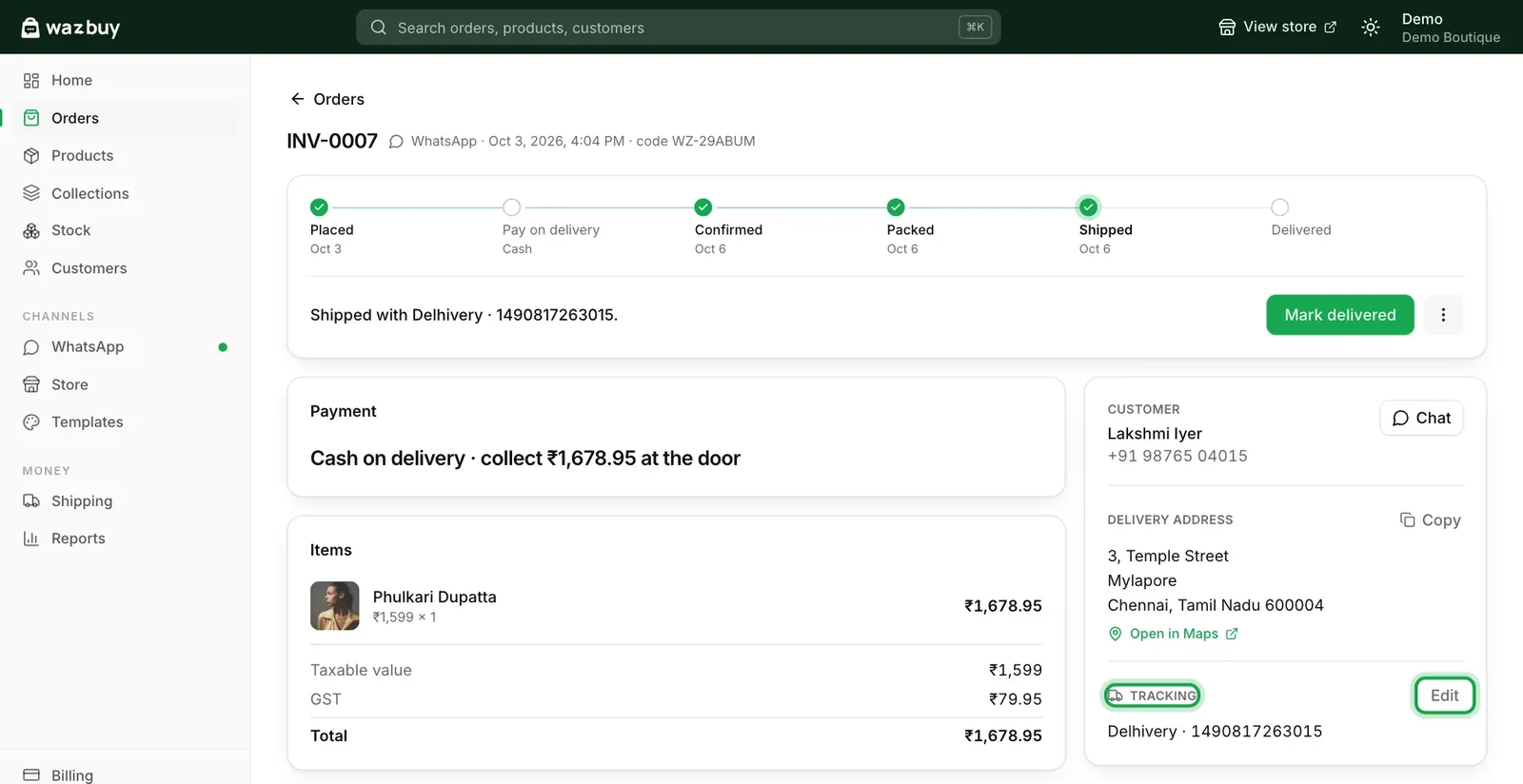
An order shipped with tracking, ready to mark delivered.
Add a product once. Sell it everywhere.
The same product shows in your chats and on your store, with the same price and the same stock.
- Up to 10 photos. Crop each one to fit your store, and give each colour its own photo.
- Sizes, colours and stock. Each size and colour can have its own price and count. Low stock shows up on your home page.
- A code and a QR for every product. Copy the link and caption, or download the QR for your reels and stories.
- GST ready. Set the GST rate for each product, with prices that include GST.
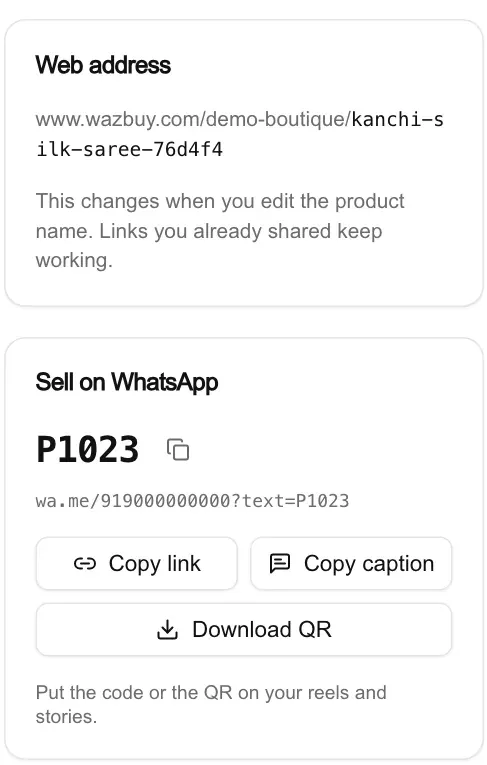
Every product gets a web address, a code and a QR.
Know what your buyers do.
See how many buyers messaged, what they asked about and where they stopped before paying.
- WhatsApp analytics. Customers, messages, orders, the steps from hello to paid order, and the hours buyers message you most.
- Website visitors. Visits, orders and where people came from, like WhatsApp, Instagram or Google. No cookies or tracking pixels.
- Reports. Sales, profit, customers and a GST report with CGST, SGST, IGST and HSN. Export sales, customers and the GST HSN summary as CSV.
- Smart reply insights. What the bot answered by itself, what it handed to you, and why. Premium
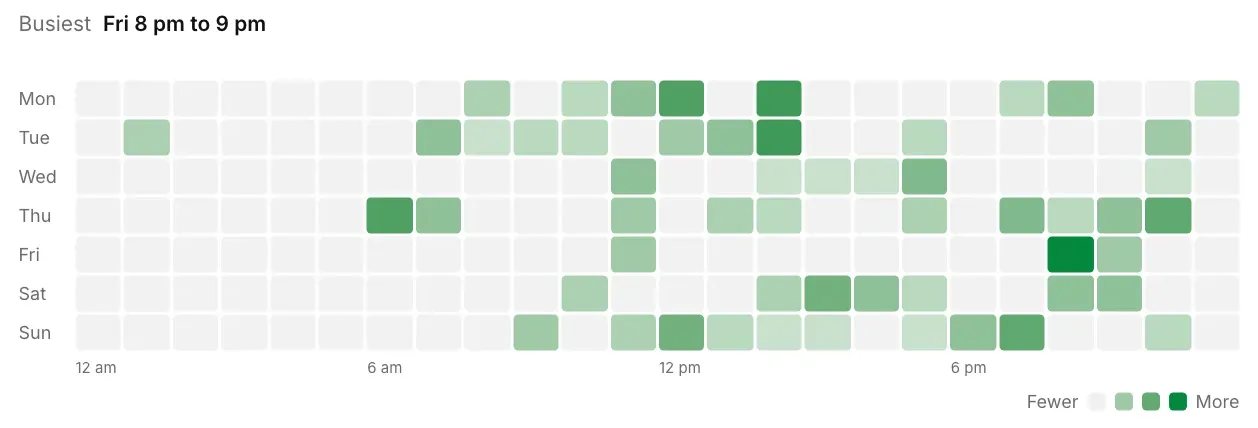
Busiest times, from the WhatsApp analytics page.
The small things that save you time.
Home page
Sales and orders, all time. Chats and store visits for the last 7 days. Orders to confirm and low stock.
Customers
Every buyer in one list, with tags and filters. Import and export as CSV.
Store QR poster
Print it for your counter, or send it as a picture. Scanning opens your store.
Meta approved updates
Shipping updates still reach buyers who have not written in the last 24 hours.
Files
All the photos and files your shop keeps, and how much room they take.
Checkout reminder
A gentle nudge to buyers who stopped before paying.
Setup checklist
Every step to go live, in order. The bot and store switch on by themselves.
Help guides
96 step by step guides with pictures, right inside the app.
Official WhatsApp, and clear costs.
On Meta's official platform
WazBuy is a Meta Tech Provider. Your number runs on Meta's official WhatsApp Business Platform.
No WazBuy fee per WhatsApp message
WazBuy adds no fee per WhatsApp message. Meta bills its own WhatsApp charges straight to the card you add in Meta. Smart replies use AI reply credits, and extra product packs are an add-on.
People who help
Stuck on a Meta step? Message our team on WhatsApp and we will walk you through it.
Frequently asked questions
Do my buyers need to install an app?
Can I keep using the WhatsApp Business app on my phone?
What do I need before I start?
How long until my bot is live?
How do buyers pay?
Does the bot reply in Indian languages?
How much does WazBuy cost?
Start selling on WhatsApp
with WazBuy.
Create your shop, add your first products and connect your number. We are here on WhatsApp if you need a hand.